
If you’re trying to reserve tickets for the Nintendo Museum from the U.S., there’s one step that can feel surprisingly intimidating: Call Verification.
Will someone pick up?
Do I have to speak in Japanese?
How do I call Japan?
I had all of these questions too.
The good news? After actually completing the verification from the U.S., I learned that almost every fear is unnecessary. You don’t talk to anyone, the call lasts one second, and there are no extra charges to your phone bill.
This guide breaks down exactly what happens, what you’ll see on your screen, and how to complete the call smoothly — even if international calls make you nervous.
📌 Still need to apply for the ticket lottery?
I’ve written a full step-by-step guide here:
👉 Nintendo Museum Kyoto Ticket Guide
This article walks you through the lottery system, deadlines, and the purchase process from abroad.
What “Call Verification” Actually Is
When you win the Nintendo Museum ticket lottery, the system requires one final step before you can complete your purchase: Call Verification.
The name sounds serious — almost like you’ll need to talk to someone or confirm something verbally — but that’s not what happens at all.
Call Verification is simply an automated check to confirm that the phone number you entered during the lottery registration is real and belongs to you.
There is no conversation, no menu prompts, and no Japanese required.
You call the number shown on your screen, the system automatically detects your call, and the process ends instantly.
- No one answers the phone
- The call disconnects automatically after about one second
- The system registers the call instantly
- Nintendo clearly states that there are no extra charges for this verification step
In other words, Call Verification is not a “phone call” in the traditional sense — it’s closer to tapping a button that just happens to be in the form of a phone call.
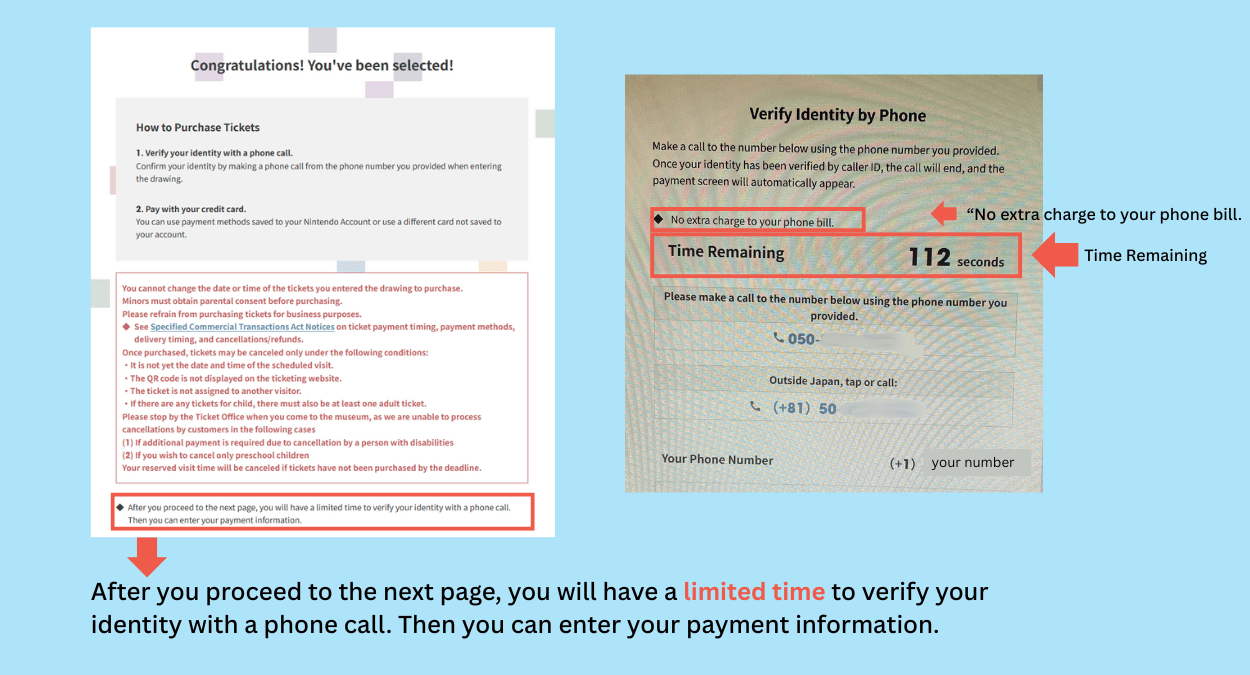
What You’ll See on Your Screen Before the Call
Before the call verification begins, you’ll see a screen that can feel a little intense at first — especially if you’re doing this from overseas. Here’s exactly what appears and what each part means so you know what to expect.
This is what you’ll see right before making the verification call.
The screen shows:
- A countdown timer (example: “112 seconds”)
- The phone number you need to call
- A note that says “No extra charge to your phone bill.”
A Phone Number Starting With +81 (Japan’s Country Code)
The screen shows a phone number in two formats:
- 050–xxxx(for calls within Japan)
- +81 50–xxxx(for calls from overseas)
For callers in the U.S.:
- You must dial the +81 version
- You do not add a “0” at the beginning
- The system uses Caller ID to confirm the registered phone number
How to Enter “+81” on Your Smartphone
One of the most common worries during this step is:
“How do I type +81 on my phone…? I don’t see a + button!”
Don’t worry — the plus sign is hidden, but it’s very easy once you know where to tap.
On iPhone (U.S. Carrier)
- Open the Phone app
- Switch to the “Keypad” screen
- Press and hold the “0” key
- After one second, a + symbol will appear
- Release your finger → the + will be entered automatically
On Android (most models)
- Open the Phone app
- Go to the dial pad
- Press and hold “0”
- The + will appear
- Release your finger to enter +
If your Android keypad looks different, look for:
- A small “+” above the 0
- A long-press hint
- Or a small globe icon to switch to “international dialing”
What Happens During the Call
This is the step that makes most people nervous — myself included.
“Will someone pick up?”
“Do I have to say something in Japanese?”
“What if I call and nothing happens?”
Here’s the truth:
The entire call lasts about one second — and you won’t talk to anyone.
The moment the call connects, Nintendo’s system reads your Caller ID and checks if the phone number matches the one registered in the lottery application.
This check is instant — literally under a second.
- You won’t hear any ringing
- You won’t hear a voice
- No one answers
- You won’t hear a menu or recording
- The line disconnects almost immediately
The system hangs up on you because your identity has already been verified.
After the call disconnects, the screen will automatically move to the next step, and you’ll be able to continue to the payment page within a few seconds.
Summary: Call Verification Is Easier Than It Looks
If you’re calling from the U.S., the verification step can look intimidating — a countdown timer, an international number, and the fear that someone might answer in Japanese.
But as you’ve seen, the process is extremely simple:
- The call lasts one second
- No one answers
- No Japanese required
- No extra charges
- And you can retry if needed
Once you know how to dial +81 and what the verification screen looks like, the hardest part is simply staying calm during the countdown.
📌 Still need to apply for the ticket lottery?
I’ve written a full step-by-step guide here:
👉 Nintendo Museum Kyoto Ticket Guide