
Before buying an eSIM for your Japan trip, it’s important to make sure your phone supports eSIM technology.
This quick guide shows you how to check compatibility in under a minute.
Step 1: Check Your Phone Settings
For iPhone
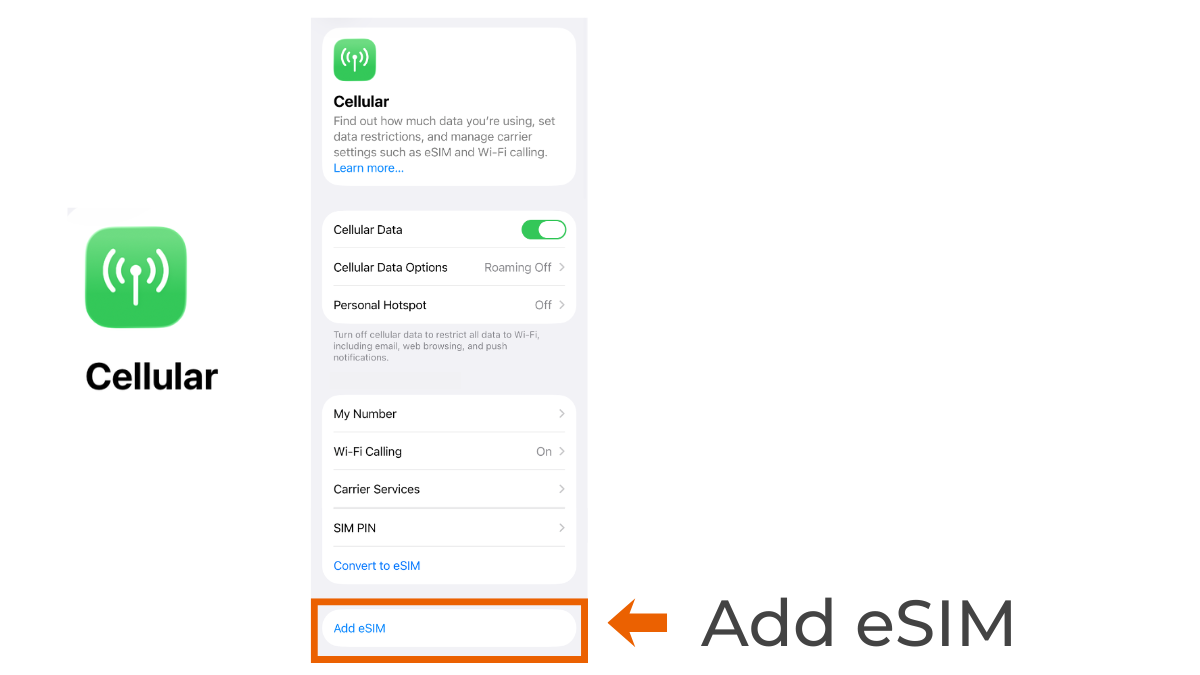
Go to Settings → Cellular (or Mobile Data).
If you see options like “Add eSIM” or “Add Cellular Plan,” your iPhone supports eSIM.
For Android
Go to Settings → Network & Internet → SIMs (menu names may vary by device).
Look for options such as “Add eSIM” or “Download a SIM instead.”
Step 2: Make Sure Your Phone Is Unlocked
Even if your phone supports eSIM, it also needs to be unlocked to use a travel eSIM.
Seeing an “Add eSIM” option means your phone supports eSIM technology, but it doesn’t necessarily mean the device is unlocked.
How to check on iPhone
Go to Settings → General → About
Scroll down to Carrier Lock
- No SIM restrictions → your iPhone is unlocked
- SIM locked → your iPhone is still locked
How to check on Android
The steps vary by device, but you can usually check under:
Settings → Network / SIM settings → SIM status
If you’re unsure, the easiest way is to check with the carrier where you purchased your phone.
Still not sure? Try this quick check
If you can’t find an eSIM option in your phone settings, there’s another quick way to check.
If you can’t find an eSIM option in your phone settings, there’s another quick way to check.
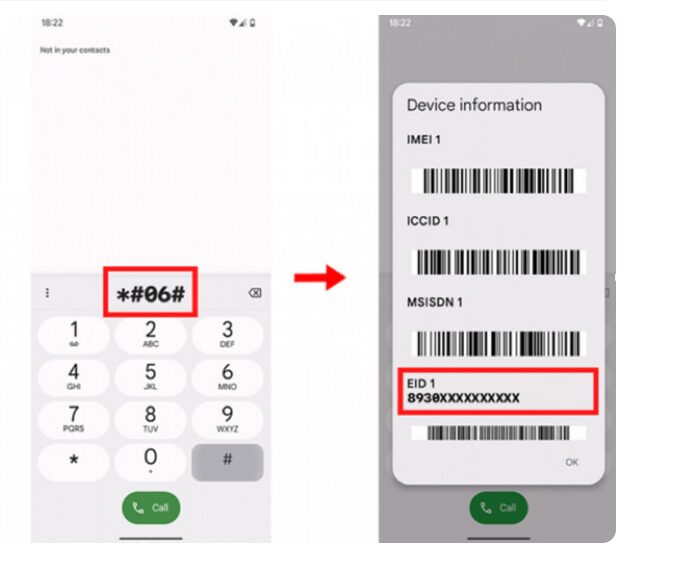
Dial *#06# on your phone.
If an EID number appears, your device supports eSIM.
Seeing an EID means your phone supports eSIM, but your device still needs to be unlocked to use a travel eSIM.
Check the Official Product Page
Each eSIM product usually includes a compatibility list on its product page.
You can double-check compatibility for Klook eSIM Japan directly on Klook before buying.
You can check the official Klook eSIM compatibility list on their FAQ page, where many supported devices are listed. This helps confirm if your phone is compatible before you buy.
Klook Travel
What to Do Next
Now that you’ve confirmed your phone supports eSIM and is unlocked, you’re ready for the next step.